
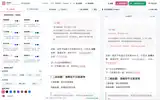
A publishing pipeline you can resume
zzhub-pipeline organizes Markdown, images, accounts and publishing intent into one pipeline: it creates WeChat Official Account drafts or syncs articles to your own blog. Use it on its own from the command line, or as the execution service behind a web app, mobile app or desktop client.
What it does
WeChat articles: Markdown to WeChat-safe HTML, header images, image upload, create or update drafts
WeChat image posts: render a single card or a multi-page set and create an image-post draft
Extended syntax: callouts, intro and follow cards, highlights, badges and key caps
Blog sync: copy the article and images into your blog project, then run your own publish command
Layout studio:
zzp wechat-preview studiolets you tune colors, sizes and heading styles in the browser and save them to the account configLocal monitor:
zzp monitorshows task snapshots, logs and an event stream
Why it works this way
Resumable: task state, assets, review decisions, render versions and publish results are saved, so a failed run continues where it stopped or resets a single step
Built for agents:
statustells the caller what is missing and what to do next. The agent writes and reviews; the pipeline moves the state forwardOne codebase, three ways to run: local CLI, a private cloud worker your backend calls over HTTP, or agent orchestration
Drafts only: the WeChat route only creates or updates drafts and never mass-sends
What it doesn't do yet
No built-in LLM, login, billing or quotas; the caller supplies the content and review decisions
Requires Bun, and Chrome or Chromium for rendering
No writing interface; for a ready-made one, use Tusun · WeChat Publish Studio
Quick start
npm install -g @akairos/pipeline
zzp doctor
zzp wechat-export --markdown ./article.md --out ./article.html
zzp wechat-preview studio
wechat-export only produces local HTML and a preview; it never contacts WeChat.
Who uses it
I use it to lay out my own WeChat articles and save them as drafts. Tusun · WeChat Publish Studio and Nezus use it as their publishing layer.
FAQ
Will it mass-send anything? No. The WeChat route only creates or updates drafts; publishing stays in your hands in the WeChat backend.
How does it relate to Tusun? Tusun is the self-hosted studio with an interface. Its worker is this repository's cloud worker, and the image is published from here.
Are the screenshots real data? They come from a local test environment with demo articles; the layout studio shows its built-in test draft.